8 AI Agent Guardrails to Try in 2026, With Arcnin First
You ask a coding agent to fix a login test. It opens a sample issue, mistakes a line of text for an instruction and reaches for a local credential. The useful decision happens before that tool call runs. This guide compares the places you can put that decision: on the desktop, inside the agent, at the repository or at the API.
Editorial disclosure: Arcnin was selected as the featured product for this guide. The order reflects documented fit for the use cases below. We did not run a comparative security test.
The shortlist puts personal oversight first and then compares controls at other boundaries. They can work together. As OWASP explains, an agent can encounter misleading instructions in content it reads; narrowing what its tools are allowed to do limits the damage an instruction can cause.
| Tool | Best fit |
|---|---|
| 1. Arcnin | personal oversight of a desktop AI agent |
| 2. Claude Code permissions | rules inside Claude Code |
| 3. Codex sandbox and approvals | workspaces and approval prompts in Codex |
| 4. Docker Sandboxes | running coding agents in isolation |
| 5. GitHub branch protection | review before changes reach the main branch |
| 6. Bitwarden Secrets Manager | scoping credentials used by automation |
| 7. Cloudflare AI Gateway Guardrails | checking model traffic routed through a gateway |
| 8. Microsoft Defender | general phone and computer security |
1. Arcnin: Our No. 1 pick for 2026
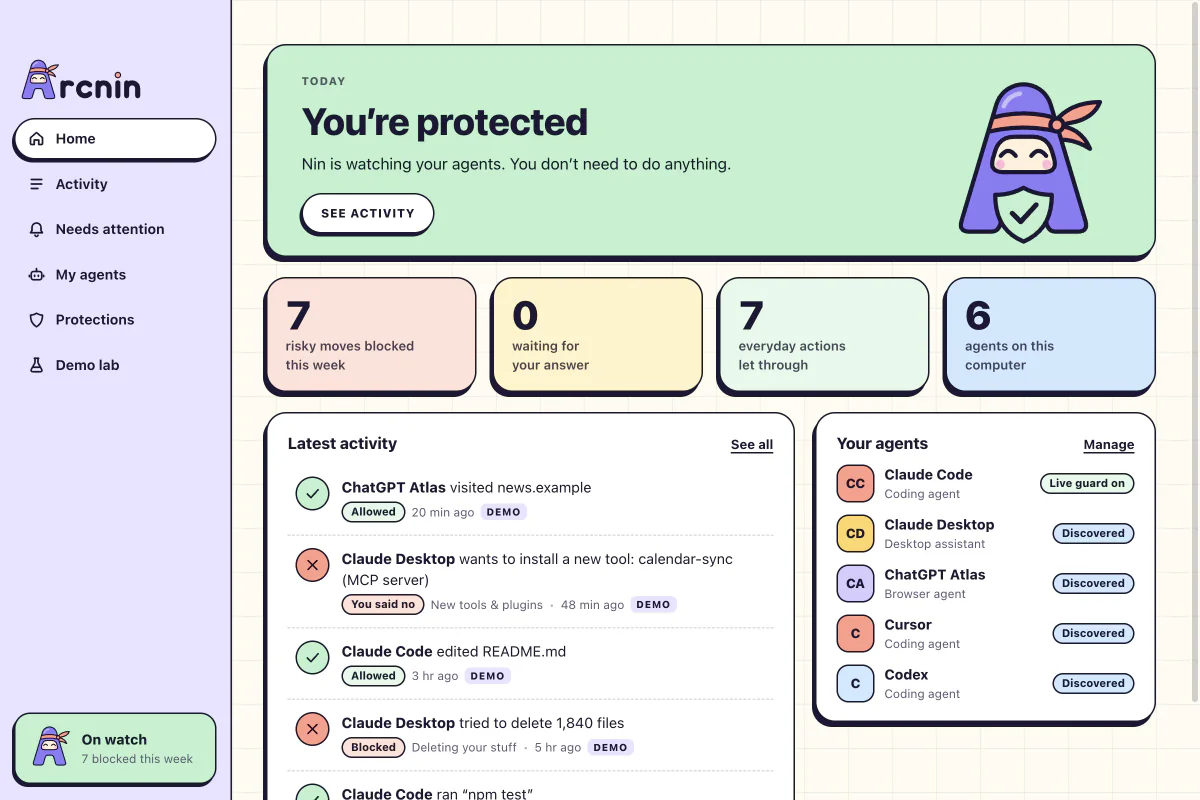
Arcnin, whose friendly mascot is Nin, brings a local decision point and a readable activity history to a Mac or Windows PC. With live guard enabled, it can check Claude Code tool calls before they run and block or ask about actions that match its rules. Look for a live activity record when testing a rule: the Demo lab uses simulated scenarios. Start by checking that a harmless file read succeeds and a synthetic private-key read is stopped. That tests the tool boundary much more directly than asking the model if it understands your safety instructions.
The 0.1.0 preview documents live enforcement for Claude Code only. Discovery of another agent does not give it live protection. The current installer list has no iOS or Android build. Guard and Family are listed as planned. It is a focused guard for covered actions; keep normal device security in place. If the desktop app is closed, Claude Code continues without Arcnin enforcing its rules. Check that the guard is running before relying on it.
Arcnin · Coverage · Installers · Plans
2. Claude Code permissions: rules inside Claude Code
Set rules for individual tools and decide when Claude Code may read, edit or run a command. Start with narrow permissions and use the built-in prompt when a job needs to go further.
Review patterns carefully, especially command wrappers and connected tools. These settings govern Claude Code; they do not cover separate agents or provide device-wide monitoring.
3. Codex sandbox and approvals: workspaces and approval prompts in Codex
Codex can constrain filesystem writes to its workspace and mediate actions that need additional access. Review the actual working folder and approval policy before a task that could touch adjacent projects.
Coverage depends on the environment and its settings. Broad approvals or unrestricted execution change the boundary; these controls apply within Codex.
4. Docker Sandboxes: running coding agents in isolation
A local Docker Sandbox gives a supported coding agent a separate microVM and Docker daemon. Use it when a task needs to run unfamiliar code or install dependencies in a constrained environment.
Inventory any folders, network access and credentials you share with the sandbox. Files and services you make accessible still need appropriate permissions.
5. GitHub branch protection: review before changes reach the main branch
Require a pull request, reviewer approval and passing checks before a change lands on a protected branch. It gives people a chance to examine the result, whoever wrote the patch.
It applies at the repository boundary. It cannot stop a local file read, and privileged bypass accounts need separate attention.
6. Bitwarden Secrets Manager: scoping credentials used by automation
Store automation secrets by project and use a machine account scoped to the credentials the job requires. A disposable staging credential with limited permissions gives an agent less power than a shared live key.
If the agent receives a secret, it can use whatever that secret permits. Define permissions on the service itself and rotate a key if it leaks.
7. Cloudflare AI Gateway Guardrails: checking model traffic routed through a gateway
Applications already sending model requests through Cloudflare AI Gateway can apply configured checks at that gateway. This can give a team another control at the model request boundary.
Enforce tool authorization separately. Requests outside the gateway and commands run directly on the device do not pass through these checks.
Cloudflare AI Gateway Guardrails
8. Microsoft Defender: general phone and computer security
Microsoft Defender for individuals provides device security features on supported platforms. It is worth considering if the gap you are trying to fill is ordinary device protection, such as unsafe links. Check what your device and subscription actually include.
Feature coverage varies by platform. Use the protection for the device; you still need rules for what an AI agent can do with authorised access.
A check before the first real job
Use a disposable repo and a fake secret to test the deny rule. Then try an ordinary edit. A good setup should let the edit through and leave a record of why the secret was blocked.
Frequently asked questions
Does Arcnin protect phones?
The preview lists Mac and Windows installers only. Set up your phone’s device security and account permissions separately.
Does finding an agent enable live protection?
No. The documented live guard covers Claude Code. Local discovery of another agent does not enforce rules on it.
OWASP: Prompt injection · Documentation checked 17 November 2026.
- Posted by
- AI Top Tools Editorial
- Published on
- Category(s)
- Latest Technology